
WiFi · Networking
WiFi: How It Works and Why It's Hard
Radio physics, the consumer vs. enterprise gap, and what good WiFi design looks like.
Why WiFi Is Harder Than It Looks
WiFi looks simple because it's invisible. That invisibility is precisely what makes it difficult to design, troubleshoot, and operate well.
The Physics
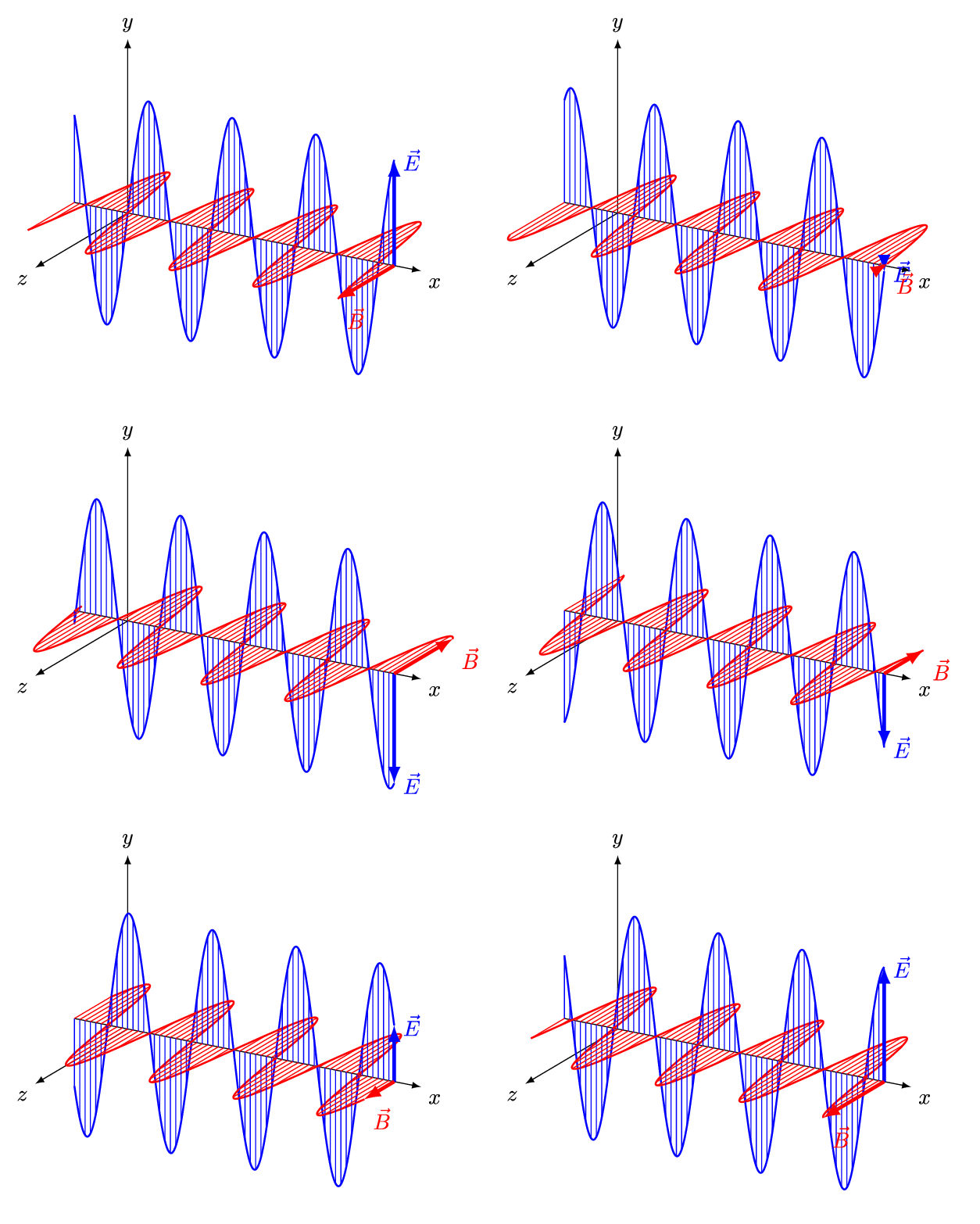
WiFi is radio — electromagnetic waves at specific frequencies carrying your data through the air. These waves have a dual nature: they sometimes behave like particles (traveling in straight lines like a bullet) and sometimes like waves (spreading outward, penetrating matter, bouncing off surfaces).
That dual nature is critical to developing intuition about wireless in the real world. A 5GHz signal behaves more particle-like — straighter paths, more absorption by walls. A 2.4GHz signal behaves more wave-like — longer range, better wall penetration, more susceptibility to interference from other sources using the same frequencies.
(If you've encountered the double-slit experiment in physics, this is the same wave-particle duality at work — and it's directly relevant to why WiFi behaves differently in different environments.)
The Frequency Bands
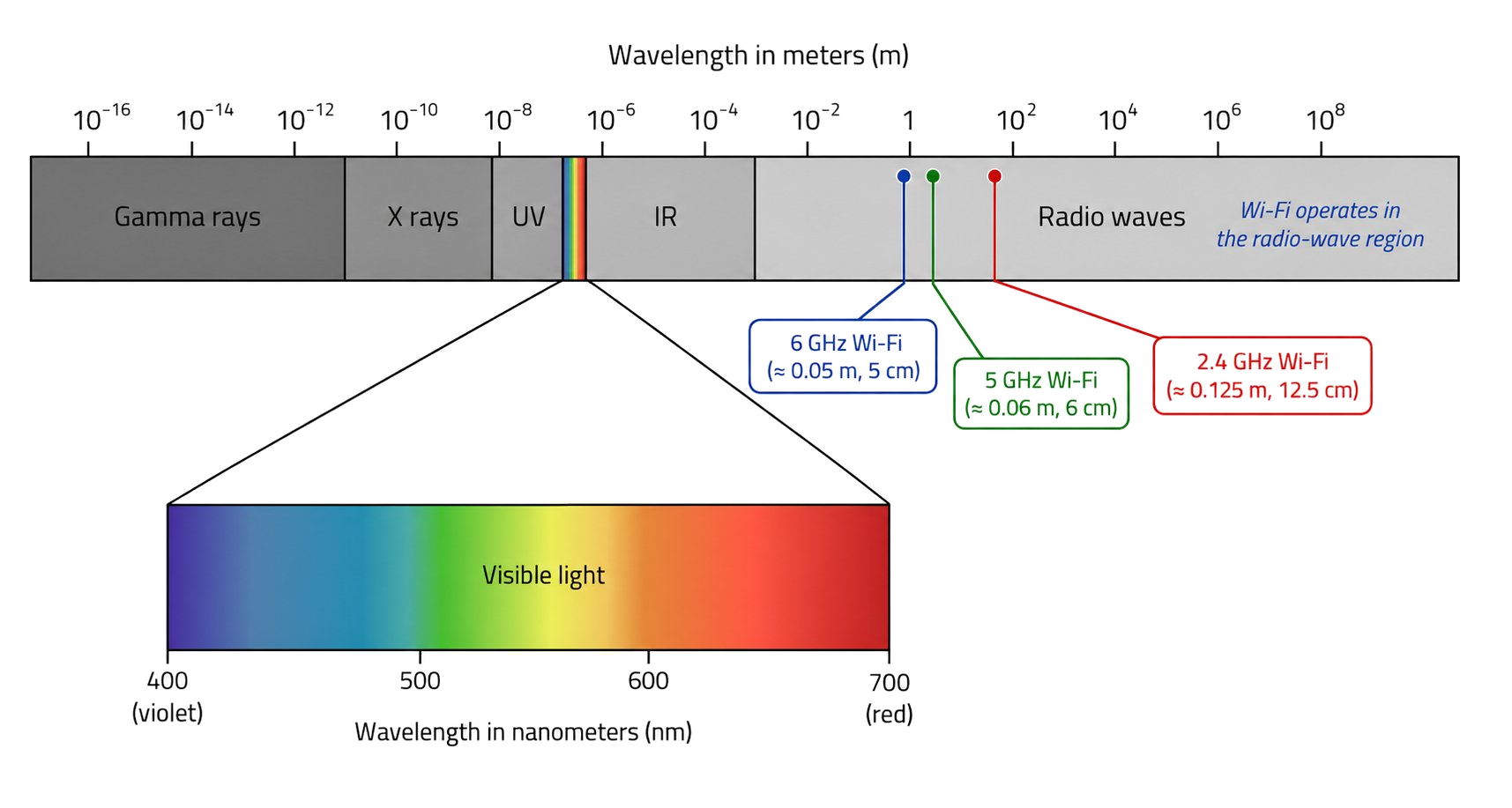
2.4 GHz: Longer range, better wall penetration. Only 3 non-overlapping channels. Heavily congested — shared with Bluetooth, microwave ovens (water resonates at 2.45GHz, which is literally why microwaves cook food), baby monitors, Sonos speakers, and every neighbor's WiFi. In NYC and other dense urban environments, 2.4GHz is like being in an apartment building where every unit is blasting music at full volume with no sound insulation anywhere — you hear all of it. Everyone's signal is everyone else's noise. This is why we almost always prefer 5GHz.
5 GHz: Shorter range, worse wall penetration. 25 non-overlapping channels (including DFS channels shared with radar). Much higher speeds, much less congestion. The modern primary band.
6 GHz (WiFi 6EExtends Wi-Fi 6 into the 6GHz frequency band, adding up to 7 new 160MHz channels completely free of the congestion that plagues 2.4GHz and 5GHz in dense environments.): Very short range. Completely clean spectrum with no legacy device interference. Highest speeds. Limited to high-end enterprise hardware and modern client devices.
Why Channels Matter

A channel is a narrow slice of the frequency spectrum. The 2.4GHz band has only 11 channels in the US but only channels 1, 6, and 11 are non-overlapping — the rest cause adjacent-channel interference. In a dense office building with dozens of neighboring WiFi networks, every AP is fighting for one of three usable channels. This is why 2.4GHz feels congested in NYC in a way that 5GHz doesn't.
Channel width trades off throughput vs. spectrum efficiency. 20MHz channels allow more devices to coexist. 40MHz, 80MHz, or 160MHz channels deliver more bandwidth per device but leave less spectrum for neighbors. In a dense environment (stadium, conference, open office), narrower channels serve more devices. In a home or small office, wider channels maximize speed.
The Client Decision Problem
When a laptop joins a WiFi network, which AP it connects to — and when it roams to a closer one — is the client's decision, not the network's. Clients are notoriously bad at this.
Classic example: you open your laptop at the far end of a long hallway and connect to WiFi. As you walk toward the other end, your laptop should detect the signal from the far AP getting stronger and roam — but it often doesn't. The "sticky client" problem is a client-side behavior that holds degraded connections to distant APs long past when roamingThe process by which a wireless device transitions from one access point to another as it moves through a space, ideally without dropping connections or interrupting ongoing sessions. would improve performance.
This is where WiFi controllers matter.
Controllers
An enterprise WiFi controller monitors all APs and all connected clients simultaneously. When it detects a client that should have roamed but didn't, it sends a command to the current AP to drop that client, forcing it to seek a better connection. From the user's perspective: seamless. From the network's perspective: controlled.
Controllers also coordinate channel assignments across APs, adjusting dynamically based on RF conditions to minimize co-channel interference.
Consumer vs. Enterprise
Consumer WiFi (Eero, Orbi, Google Nest WiFi): Each AP makes independent decisions. No RF coordination between units. No VLANA logical segment on a physical switch that isolates traffic between device groups — separate networks without extra hardware. support. No per-device diagnostics. Adequate for homes and very small offices.
Enterprise WiFi (Ruckus, Cisco Catalyst, Aruba, Meraki, Ubiquiti UniFi at the prosumer level): Controller-managed. Directed roaming. Channel coordination. Per-client signal quality metrics. Full VLAN support. Client density planning.
What Good WiFi Design Looks Like
A proper enterprise deployment starts with understanding the physical environment before installing anything. Coverage (signal everywhere) is not the same as capacity (enough bandwidth for concurrent users at load).
General principles:
- 5GHz preferred; 2.4GHz for devices that need it
- Overlapping cells at 20–30% for roaming, not 80% (which creates interference)
- Client density planning: how many devices per AP at peak?
- Separate SSIDs per VLAN, proper segmentation through the wireless layer
- Survey the RF environment before finalizing AP placement
When Consumer WiFi Is Adequate
A 5-person team in a single open-plan space: consumer mesh WiFi works fine. The inflection point where it stops being adequate is usually around 15–20 simultaneous heavy users, any meaningful segmentation requirement, or environments with challenging RF characteristics (large floor plates, concrete construction, multiple stories).