
Cabling
Fiber Optics
When to use it, what you're buying, and how single-mode and multi-mode differ.
How Fiber Works
Fiber optic cabling carries data as pulses of light through glass or plastic fiber, rather than electrical signals through copper.
The physics: light enters a fiber strand and travels through it via total internal reflection — a phenomenon where light hitting the boundary between the glass core and the surrounding cladding at a shallow enough angle bounces completely back into the core rather than passing through. The light stays trapped in the glass, bouncing its way along the fiber across long distances.
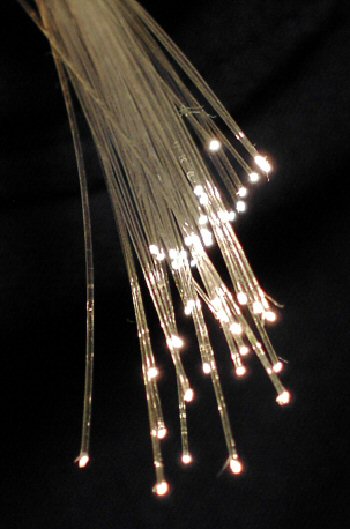
That light represents binary data in a Morse-code fashion: light on for 1, light off for 0, pulsed at extremely high frequencies. A laser or LED transceiver generates the pulses; a receiving transceiver detects them and converts them back to electrical signals the network equipment can use.
Single-Mode vs. Multi-Mode
Single-mode fiber (SMF):
- Very thin core (9 microns — for scale: a human hair is roughly 70 microns in diameter — single-mode fiber's core is about 8× thinner)
- A single light path travels through the fiber
- Extremely low signal attenuationThe loss of signal strength as it travels through a cable or fiber. Too much attenuation and the signal is too weak to be reliably decoded at the far end. — spans 40km+ without amplification
Single-mode fiber is also the medium that connects the world at scale. Every transatlantic internet cable is single-mode fiber. Every cell tower connects back to the telecom network via fiber. The phone call you make, the video you stream, the email you send — all of it rides fiber at some point in its journey. At the extreme end, research labs have demonstrated transmission speeds of roughly 80× faster than today's commercial deployments over a single strand.
- Requires precise, laser-based transceivers
- Higher per-transceiver cost
- Standard grades: OS1 (tight-buffered, indoor), OS2 (loose tube, outdoor/longer runs)
- Used for: telecom infrastructure, WANA network spanning multiple locations — branch offices to headquarters, or your office to the internet. Your internet circuit is a WAN link. links, campus backbone between buildings
Multi-mode fiber (MMF):
- Larger core (50 microns for modern OM grades — still thinner than a human hair, but 5–6× larger than single-mode)
- Multiple light paths travel simultaneously
- Higher attenuation — practical range is 300m–2km depending on speed
- Works with LED-based or VCSEL transceivers (less expensive)
- Standard grades: OM1 (100Mbps), OM2 (1G), OM3 (10G to 300m), OM4 (10G to 550m, 40G/100G to shorter distances)
- Used for: within-building runs, data center horizontal cabling, server-to-switch connections
For most data center and intra-building applications: OM3 or OM4 multi-mode. For building-to-building or anything over ~500m: single-mode.
Common Connectors
- LC: Small form factor with a latching mechanism. The standard in modern enterprise networking — almost everything uses LC.
- SC: Larger square connector. Common in older installations, still widely deployed.
- MTP/MPOHigh-density fiber optic connectors that terminate 12, 24, or more fibers in a single plug — used for high-speed backbone connections and data center trunk cabling.: Multi-fiber connector terminating 8, 12, or 24 fibers simultaneously. Used in high-density data center applications.
Transceivers
A transceiver (SFP, SFP+, QSFP28, etc.) sits in a port on a switch or router and does one job: convert electrical data signals into optical pulses (transmit) and optical pulses back into electrical signals (receive). The transceiver is wavelengthWavelength is the physical distance between two peaks of a wave. In networking, it refers to the wavelength of light used in fiber optic transceivers — different wavelengths travel different distances and enable WDM (multiple channels on one fiber).-specific and must match the fiber type (single-mode or multi-mode) and the distance requirement.
Common form factors:
- SFP/SFP+: 1G/10G. The standard for most enterprise switching
- QSFP28: 100G. Data center standard for spine/leaf interconnects
- QSFP-DD: Up to 400G. At the forefront of data center density
When to Use Fiber vs. Copper
Fiber is right when:
- Run length exceeds ~90m (copper's structured cabling limit)
- The path crosses between buildings (copper has ground potential issues; fiber is electrically isolated)
- EMIEMI (Electromagnetic Interference) is interference from electromagnetic radiation that disrupts electronic devices and communications — caused by motors, radios, power lines, and other radiating sources nearby. is a concern (near industrial motors, generators, or high-voltage electrical equipment)
- Bandwidth requirements at distance exceed what copper supports
Copper is typically preferred when:
- Runs are under 90m
- PoEDelivers DC power over an Ethernet cable alongside data, eliminating the need for a separate power outlet at devices like IP phones, access points, and security cameras. is needed — fiber cannot carry power
- Cost is a constraint and copper meets the speed/distance requirements